
You’ve bought the new TV. Now comes the part most people rush: picking the bracket that will hold it on the wall for the next five or ten years.
It’s an easy decision to get wrong. Choose a mount that’s too weak and it sags. Choose the wrong type and you’re stuck watching glare or craning your neck. The fix is simple, though. Check four things before you buy, and you’ll get it right the first time.
At Ibrahim Electronics in Al Sulimaniyah, Riyadh, we set up satellite receivers and beIN boxes in homes across the city, so we see a lot of TV setups, good and bad. Here’s what we’ve learned.
Start With Your Room, Not the Mount
The right mount depends on how you actually watch TV.
Big majlis or family room? If people sit on different sides of the room, a full-motion mount lets you swing the screen towards them.
Small apartment living room? A slim fixed or tilting mount keeps the TV close to the wall and saves space.
Renting? Ask your landlord before drilling. A mount with a small wall plate leaves fewer holes to fill when you move out.
Café or shop showing matches? Screens usually go up high, so a tilting mount angles them down towards customers.
Four Things to Check Before You Buy
1. The VESA pattern
Turn your TV around. The four screw holes on the back follow a standard pattern, such as 200 × 200 mm or 400 × 400 mm. That’s the VESA size, and your mount must support it. You’ll find it in the TV manual, or you can measure it with a tape.
2. Size and weight limits
Every mount lists a maximum screen size and weight. Don’t buy one that only just covers your TV. Leave some margin, especially for full-motion arms, which put more strain on the wall.
3. Your wall
This matters more than the mount itself. Concrete and block walls, common in Riyadh homes, hold a TV well with proper anchors. Gypsum board is a different story. It needs heavy-duty anchors made for that wall, or the mount has to go into the frame behind it.
4. Viewing height
Most people mount TVs too high. For sofa viewing, the centre of the screen should sit close to your eye level when you’re seated.
Quick tip: Cut a piece of cardboard to the size of your TV and tape it to the wall. Sit down and watch “it” for a few minutes. If your neck tilts up, go lower.
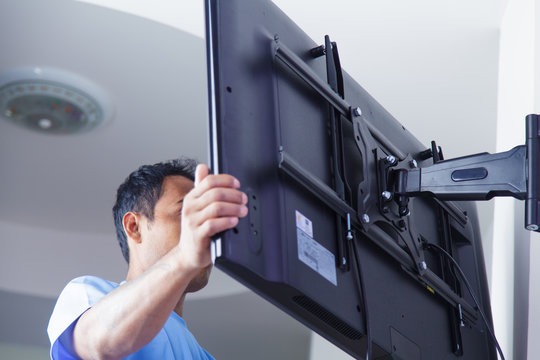
Fixed, Tilting or Full-Motion?
- Fixed: sits flat and slim against the wall. Perfect when you always watch from straight in front.
- Tilting: angles up or down. Great for bright rooms or TVs mounted a little higher.
- Full-motion: pulls out, swings and tilts. Best for large rooms, corners and open-plan spaces.
- Ceiling: mostly for shops, cafés and offices where wall space is limited.
If you’re unsure, a tilting mount is a safe middle ground for most homes.
Mistakes We See All the Time
- Buying a mount before checking the TV’s VESA size
- Using light plastic plugs in gypsum board
- Mounting the TV at “picture frame” height instead of eye level
- Forgetting where the receiver, router and cables will go
- Leaving wires hanging below the screen
That fourth one catches a lot of people. Your satellite receiver or beIN box needs a spot with airflow, close enough for the cable to reach and in clear view of the remote. Plan that space before you drill. Moving a TV later is far more work than planning it now.
Where We Come In
Once your TV is on the wall, we take care of the rest of the setup:
- Satellite and beIN receiver setup: connected, tuned and ready to watch
- Signal check: we test strength and quality so your channels don’t drop on match night
- New receivers: if your old box doesn’t suit your new TV, see what’s in our shop
- Subscription renewal: beIN and other eligible packages renewed without the hassle
You can see everything we offer on our services page.
Get It Done Before the Big Game
New TV for the football season? Mount it and set up your receiver a few days early. If there’s a signal or subscription problem, you’ll find it on a quiet weekday, not five minutes before kick-off.
Your Questions, Answered
How do I know which wall mount fits my TV?
Check three numbers: the VESA pattern, the screen size and the weight. Your TV must fall within the mount’s limits for all three.
Can I mount a TV on gypsum board?
Yes, with the right method. Use heavy-duty anchors designed for gypsum board, or fix the mount into the frame behind it.
How high should my TV be?
For seated viewing, aim for the centre of the screen at roughly eye level. The cardboard test above is the easiest way to check.
Which mount is best for a big living room?
Full-motion. It lets you angle the screen towards whoever is watching.
Can you set up my receiver after the TV is mounted?
Yes. That’s exactly what we do.
Talk to Us
Got your TV on the wall and need the channels working? Or not sure your receiver will work with your new screen? Send us a message and we’ll tell you what you need.
- Call or WhatsApp: 0548638714
- Visit us: Al Sulimaniyah District, Riyadh
- Book online: Contact us